两种终端跑分方法介绍 | Linux 下如何跑分
介绍两种 Linux 环境下测试硬件性能的方法.
在 Linux 环境下如何测试 CPU 等硬件和
操作系统性能?目前看来常用的有 UnixBench 和 GeekBach,前者源于 Unix,GPL v2 授权下的自由软件,GeekBach 是跨平台的知名跑分软件,但结果需要上传服务器通过网址查看。
下面简单介绍两种跑分软件使用方法。
UnixBench
UnixBench 是最初的 BYTE UNIX 基准套件,经过多年的更新和修订。测试结果是一个系统指标,而非 CPU、 RAM 或磁盘指标。因此测试结果不仅取决于硬件,还取决于操作系统、库,甚至编译器,评分结果能够反映机器实际运行水平。
首先需要获取源码,方法有很多种:
- http://byte-unixbench.googlecode.com/files/UnixBench5.1.3.tgz
- https://code.google.com/p/byte-unixbench/
- https://github.com/kdlucas/byte-unixbench
- https://gitee.com/songtianlun/byte-unixbench
软件依赖以下软件包,大部分系统中都自带了,若却是可自行安装:
libx11-dev
libgl1-mesa-dev
libxext-dev
perl
perl-modules
make
gcc
这里以国内的 gitee 镜像源为例说明使用方法:
$ git clone https://gitee.com/songtianlun/byte-unixbench
$ cd byte-unixbench
$ cd UnixBench
$ make
$ ./Run
这里贴一个我的 Ubuntu 台式机跑分截图:
#    #  #    #  #  #    #          #####   ######  #    #   ####   #    #
   #    #  ##   #  #   #  #           #    #  #       ##   #  #    #  #    #
   #    #  # #  #  #    ##            #####   #####   # #  #  #       ######
   #    #  #  # #  #    ##            #    #  #       #  # #  #       #    #
   #    #  #   ##  #   #  #           #    #  #       #   ##  #    #  #    #
    ####   #    #  #  #    #          #####   ######  #    #   ####   #    #

   Version 5.1.3                      Based on the Byte Magazine Unix Benchmark

   Multi-CPU version                  Version 5 revisions by Ian Smith,
                                      Sunnyvale, CA, USA
   January 13, 2011                   johantheghost at yahoo period com

------------------------------------------------------------------------------
   Use directories for:
      * File I/O tests (named fs***) = /home/songtianlun/dev/byte-unixbench/UnixBench/tmp
      * Results                      = /home/songtianlun/dev/byte-unixbench/UnixBench/results
------------------------------------------------------------------------------

Wide character in print at ./Run line 1643.
Wide character in printf at ./Run line 1674.

1 x Dhrystone 2 using register variables  1 2 3 4 5 6 7 8 9 10

1 x Double-Precision Whetstone  1 2 3 4 5 6 7 8 9 10

1 x Execl Throughput  1 2 3

1 x File Copy 1024 bufsize 2000 maxblocks  1 2 3

1 x File Copy 256 bufsize 500 maxblocks  1 2 3

1 x File Copy 4096 bufsize 8000 maxblocks  1 2 3

1 x Pipe Throughput  1 2 3 4 5 6 7 8 9 10

1 x Pipe-based Context Switching  1 2 3 4 5 6 7 8 9 10

1 x Process Creation  1 2 3

1 x System Call Overhead  1 2 3 4 5 6 7 8 9 10

1 x Shell Scripts (1 concurrent)  1 2 3

1 x Shell Scripts (8 concurrent)  1 2 3
Wide character in printf at ./Run line 1574.

12 x Dhrystone 2 using register variables  1 2 3 4 5 6 7 8 9 10

12 x Double-Precision Whetstone  1 2 3 4 5 6 7 8 9 10

12 x Execl Throughput  1 2 3

12 x File Copy 1024 bufsize 2000 maxblocks  1 2 3
可以看到,单核跑分结果 1628.9 ,多核结果 5674.5 。炮分时可以用身边其他设备的分数作对比衡量跑分机器性能。
GeekBach
__官网__下载,跑完后通过地址查看分数即可,这里贴上部分的执行截图:
$ cd Geekbench-5.4.3-Linux/
$ ls
geekbench5  geekbench.plar  geekbench_x86_64
$ ./geekbench_x86_64
Geekbench 5.4.3 Tryout : https://www.geekbench.com/

Geekbench 5 requires an active Internet connection when in tryout mode and
automatically uploads benchmark results to the Geekbench Browser.

Buy a Geekbench 5 license from the Primate Labs Store to enable offline use
and unlock other features:

  https://store.primatelabs.com/v5

Enter your Geekbench 5 license using the following command line:

  ./geekbench_x86_64 --unlock <email> <key>

  Running Gathering system information
System Information
  Operating System              Ubuntu 20.04.3 LTS
  Kernel                        Linux 5.11.0-40-generic x86_64
  Model                         LENOVO 90M2CTO1WW
  Motherboard                   LENOVO 3176
  BIOS                          LENOVO M2YKT19A

Processor Information
  Name                          Intel Core i7-8700
  Topology                      1 Processor, 6 Cores, 12 Threads
  Identifier                    GenuineIntel Family 6 Model 158 Stepping 10
  Base Frequency                4.60 GHz
  L1 Instruction Cache          32.0 KB x 6
  L1 Data Cache                 32.0 KB x 6
  L2 Cache                      256 KB x 6
  L3 Cache                      12.0 MB

Memory Information
  Size                          15.5 GB

...
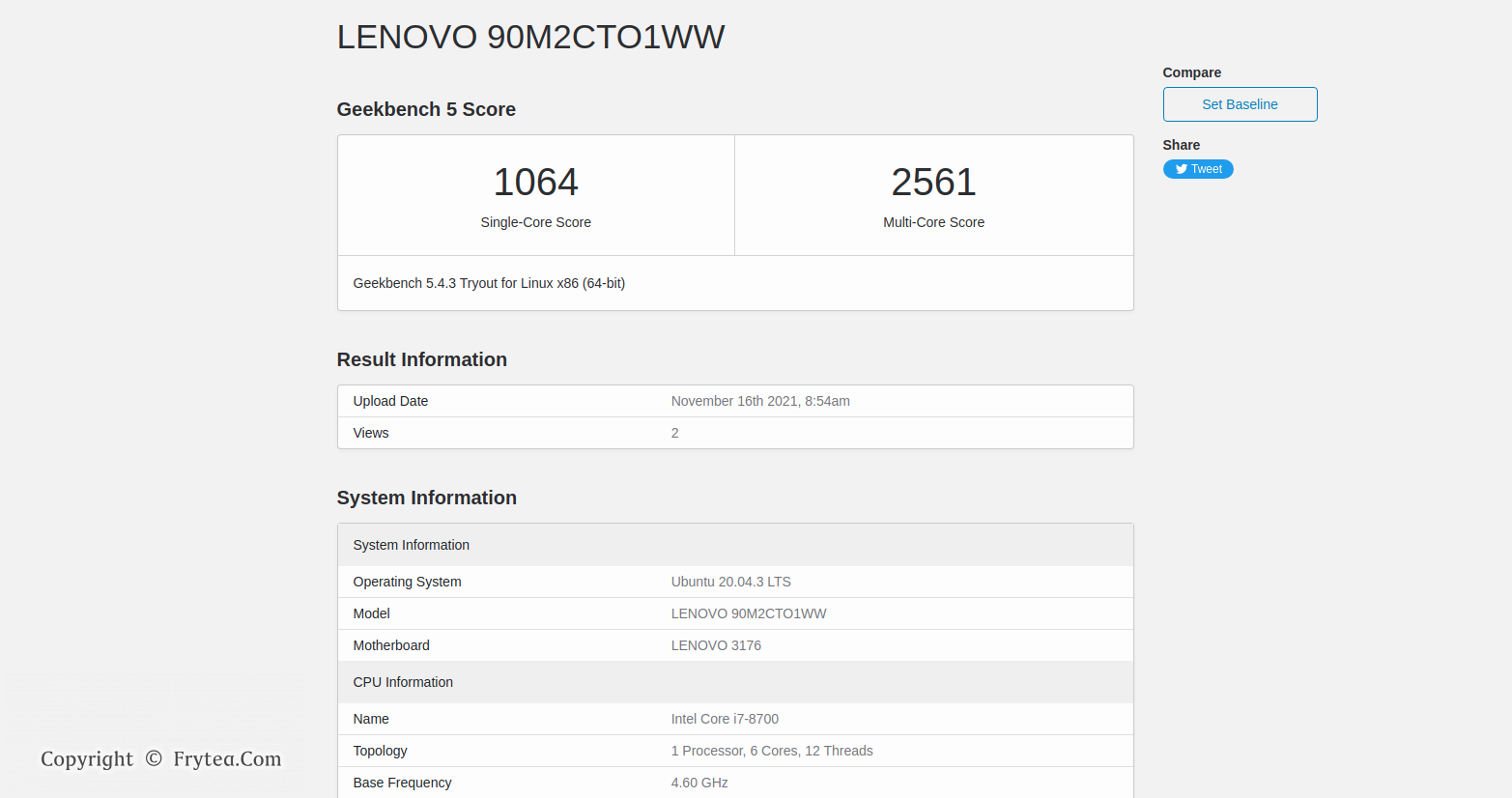
同样用 Ubuntu 台式机跑了一遍,可以在 这里 查看跑分结果:
Linux 环境下我个人倾向于使用开源软件 Unixbench ,可以直接在终端查看结果,无需联网。
至此,本文介绍了 Linux 环境下的跑分方法。