Bash 条件判断

本章介绍 Bash 脚本的条件判断语法。

if 结构

if是最常用的条件判断结构,只有符合给定条件时,才会执行指定的命令。它的语法如下。

if commands; then
  commands
[elif commands; then
  commands...]
[else
  commands]
fi

这个命令分成三个部分:if、elif和else。其中,后两个部分是可选的。

if关键字后面是主要的判断条件,elif用来添加在主条件不成立时的其他判断条件,else则是所有条件都不成立时要执行的部分。

if test $USER = "foo"; then
  echo "Hello foo."
else
  echo "You are not foo."
fi

上面的例子中,判断条件是环境变量$USER是否等于foo,如果等于就输出Hello foo.,否则输出其他内容。

if和then写在同一行时,需要分号分隔。分号是 Bash 的命令分隔符。它们也可以写成两行,这时不需要分号。

if true
then
  echo 'hello world'
fi

if false
then
  echo 'it is false' # 本行不会执行
fi

上面的例子中,true和false是两个特殊命令,前者代表操作成功,后者代表操作失败。if true意味着命令部分总是会执行,if false意味着命令部分永远不会执行。

除了多行的写法,if结构也可以写成单行。

$ if true; then echo 'hello world'; fi
hello world

$ if false; then echo "It's true."; fi

注意,if关键字后面也可以是一条命令,该条命令执行成功(返回值),就意味着判断条件成立。

$ if echo 'hi'; then echo 'hello world'; fi
hi
hello world

上面命令中,if后面是一条命令echo 'hi'。该命令会执行,如果返回值是,则执行then的部分。

if后面可以跟任意数量的命令。这时,所有命令都会执行,但是判断真伪只看最后一个命令,即使前面所有命令都失败,只要最后一个命令返回,就会执行then的部分。

$ if false; true; then echo 'hello world'; fi
hello world

上面例子中,if后面有两条命令(false;true;),第二条命令(true)决定了then的部分是否会执行。

elif部分可以有多个。

#!/bin/bash

echo -n "输入一个1到3之间的数字(包含两端)> "
read character
if [ "$character" = "1" ]; then
    echo 1
elif [ "$character" = "2" ]; then
    echo 2
elif [ "$character" = "3" ]; then
    echo 3
else
    echo 输入不符合要求
fi

上面例子中,如果用户输入3,就会连续判断3次。

test 命令

if结构的判断条件,一般使用test命令,有三种形式。

# 写法一
test expression

# 写法二
[ expression ]

# 写法三
[[ expression ]]

上面三种形式是等价的,但是第三种形式还支持正则判断,前两种不支持。

上面的expression是一个表达式。这个表达式为真,test命令执行成功(返回值为);表达式为伪,test命令执行失败(返回值为1)。注意,第二种和第三种写法,[和]与内部的表达式之间必须有空格。

$ test -f /etc/hosts
$ echo $?
0

$ [ -f /etc/hosts ]
$  echo $?
0

上面的例子中,test命令采用两种写法,判断/etc/hosts文件是否存在,这两种写法是等价的。命令执行后,返回值为,表示该文件确实存在。

实际上,[这个字符是test命令的一种简写形式,可以看作是一个独立的命令,这解释了为什么它后面必须有空格。

下面把test命令的三种形式,用在if结构中,判断一个文件是否存在。

# 写法一
if test -e /tmp/foo.txt ; then
  echo "Found foo.txt"
fi

# 写法二
if [ -e /tmp/foo.txt ] ; then
  echo "Found foo.txt"
fi

# 写法三
if [[ -e /tmp/foo.txt ]] ; then
  echo "Found foo.txt"
fi

判断表达式

if关键字后面,跟的是一个命令。这个命令可以是test命令,也可以是其他命令。命令的返回值为表示判断成立,否则表示不成立。因为这些命令主要是为了得到返回值,所以可以视为表达式。

常用的判断表达式有下面这些。

文件判断

以下表达式用来判断文件状态。

  • [ -a file ]:如果 file 存在,则为true。
  • [ -b file ]:如果 file 存在并且是一个块(设备)文件,则为true。
  • [ -c file ]:如果 file 存在并且是一个字符(设备)文件,则为true。
  • [ -d file ]:如果 file 存在并且是一个目录,则为true。
  • [ -e file ]:如果 file 存在,则为true。
  • [ -f file ]:如果 file 存在并且是一个普通文件,则为true。
  • [ -g file ]:如果 file 存在并且设置了组 ID,则为true。
  • [ -G file ]:如果 file 存在并且属于有效的组 ID,则为true。
  • [ -h file ]:如果 file 存在并且是符号链接,则为true。
  • [ -k file ]:如果 file 存在并且设置了它的“sticky bit”,则为true。
  • [ -L file ]:如果 file 存在并且是一个符号链接,则为true。
  • [ -N file ]:如果 file 存在并且自上次读取后已被修改,则为true。
  • [ -O file ]:如果 file 存在并且属于有效的用户 ID,则为true。
  • [ -p file ]:如果 file 存在并且是一个命名管道,则为true。
  • [ -r file ]:如果 file 存在并且可读(当前用户有可读权限),则为true。
  • [ -s file ]:如果 file 存在且其长度大于零,则为true。
  • [ -S file ]:如果 file 存在且是一个网络 socket,则为true。
  • [ -t fd ]:如果 fd 是一个文件描述符,并且重定向到终端,则为true。 这可以用来判断是否重定向了标准输入/输出/错误。
  • [ -u file ]:如果 file 存在并且设置了 setuid 位,则为true。
  • [ -w file ]:如果 file 存在并且可写(当前用户拥有可写权限),则为true。
  • [ -x file ]:如果 file 存在并且可执行(有效用户有执行/搜索权限),则为true。
  • [ FILE1 -nt FILE2 ]:如果 FILE1 比 FILE2 的更新时间更近,或者 FILE1 存在而 FILE2 不存在,则为true。
  • [ FILE1 -ot FILE2 ]:如果 FILE1 比 FILE2 的更新时间更旧,或者 FILE2 存在而 FILE1 不存在,则为true。
  • [ FILE1 -ef FILE2 ]:如果 FILE1 和 FILE2 引用相同的设备和 inode 编号,则为true。

下面是一个示例。

#!/bin/bash

FILE=~/.bashrc

if [ -e "$FILE" ]; then
  if [ -f "$FILE" ]; then
    echo "$FILE is a regular file."
  fi
  if [ -d "$FILE" ]; then
    echo "$FILE is a directory."
  fi
  if [ -r "$FILE" ]; then
    echo "$FILE is readable."
  fi
  if [ -w "$FILE" ]; then
    echo "$FILE is writable."
  fi
  if [ -x "$FILE" ]; then
    echo "$FILE is executable/searchable."
  fi
else
  echo "$FILE does not exist"
  exit 1
fi

上面代码中,$FILE要放在双引号之中,这样可以防止变量$FILE为空,从而出错。因为$FILE如果为空,这时[ -e $FILE ]就变成[ -e ],这会被判断为真。而$FILE放在双引号之中,[ -e "$FILE" ]就变成[ -e "" ],这会被判断为伪。

字符串判断

以下表达式用来判断字符串。

  • [ string ]:如果string不为空(长度大于0),则判断为真。
  • [ -n string ]:如果字符串string的长度大于零,则判断为真。
  • [ -z string ]:如果字符串string的长度为零,则判断为真。
  • [ string1 = string2 ]:如果string1和string2相同,则判断为真。
  • [ string1 == string2 ] 等同于[ string1 = string2 ]。
  • [ string1 != string2 ]:如果string1和string2不相同,则判断为真。
  • [ string1 '>' string2 ]:如果按照字典顺序string1排列在string2之后,则判断为真。
  • [ string1 '<' string2 ]:如果按照字典顺序string1排列在string2之前,则判断为真。

注意,test命令内部的>和<,必须用引号引起来(或者是用反斜杠转义)。否则,它们会被 shell 解释为重定向操作符。

下面是一个示例。

#!/bin/bash

ANSWER=maybe

if [ -z "$ANSWER" ]; then
  echo "There is no answer." >&2
  exit 1
fi
if [ "$ANSWER" = "yes" ]; then
  echo "The answer is YES."
elif [ "$ANSWER" = "no" ]; then
  echo "The answer is NO."
elif [ "$ANSWER" = "maybe" ]; then
  echo "The answer is MAYBE."
else
  echo "The answer is UNKNOWN."
fi

上面代码中,首先确定$ANSWER字符串是否为空。如果为空,就终止脚本,并把退出状态设为1。注意,这里的echo命令把错误信息There is no answer.重定向到标准错误,这是处理错误信息的常用方法。如果$ANSWER字符串不为空,就判断它的值是否等于yes、no或者maybe。

注意,字符串判断时,变量要放在双引号之中,比如[ -n "$COUNT" ],否则变量替换成字符串以后,test命令可能会报错,提示参数过多。另外,如果不放在双引号之中,变量为空时,命令会变成[ -n ],这时会判断为真。如果放在双引号之中,[ -n "" ]就判断为伪。

整数判断

下面的表达式用于判断整数。

  • [ integer1 -eq integer2 ]:如果integer1等于integer2,则为true。
  • [ integer1 -ne integer2 ]:如果integer1不等于integer2,则为true。
  • [ integer1 -le integer2 ]:如果integer1小于或等于integer2,则为true。
  • [ integer1 -lt integer2 ]:如果integer1小于integer2,则为true。
  • [ integer1 -ge integer2 ]:如果integer1大于或等于integer2,则为true。
  • [ integer1 -gt integer2 ]:如果integer1大于integer2,则为true。

下面是一个用法的例子。

#!/bin/bash

INT=-5

if [ -z "$INT" ]; then
  echo "INT is empty." >&2
  exit 1
fi
if [ $INT -eq 0 ]; then
  echo "INT is zero."
else
  if [ $INT -lt 0 ]; then
    echo "INT is negative."
  else
    echo "INT is positive."
  fi
  if [ $((INT % 2)) -eq 0 ]; then
    echo "INT is even."
  else
    echo "INT is odd."
  fi
fi

上面例子中,先判断变量$INT是否为空,然后判断是否为,接着判断正负,最后通过求余数判断奇偶。

正则判断

[[ expression ]]这种判断形式,支持正则表达式。

[[ string1 =~ regex ]]

上面的语法中,regex是一个正则表示式,=~是正则比较运算符。

下面是一个例子。

#!/bin/bash

INT=-5

if [[ "$INT" =~ ^-?[0-9]+$ ]]; then
  echo "INT is an integer."
  exit 0
else
  echo "INT is not an integer." >&2
  exit 1
fi

上面代码中,先判断变量INT的字符串形式,是否满足^-?[0-9]+$的正则模式,如果满足就表明它是一个整数。

test 判断的逻辑运算

通过逻辑运算,可以把多个test判断表达式结合起来,创造更复杂的判断。三种逻辑运算AND,OR,和NOT,都有自己的专用符号。

  • AND运算:符号&&,也可使用参数-a。
  • OR运算:符号||,也可使用参数-o。
  • NOT运算:符号!。

下面是一个AND的例子,判断整数是否在某个范围之内。

#!/bin/bash

MIN_VAL=1
MAX_VAL=100

INT=50

if [[ "$INT" =~ ^-?[0-9]+$ ]]; then
  if [[ $INT -ge $MIN_VAL && $INT -le $MAX_VAL ]]; then
    echo "$INT is within $MIN_VAL to $MAX_VAL."
  else
    echo "$INT is out of range."
  fi
else
  echo "INT is not an integer." >&2
  exit 1
fi

上面例子中,&&用来连接两个判断条件:大于等于$MIN_VAL,并且小于等于$MAX_VAL。

使用否定操作符!时,最好用圆括号确定转义的范围。

if [ ! \( $INT -ge $MIN_VAL -a $INT -le $MAX_VAL \) ]; then
    echo "$INT is outside $MIN_VAL to $MAX_VAL."
else
    echo "$INT is in range."
fi

上面例子中,test命令内部使用的圆括号,必须使用引号或者转义,否则会被 Bash 解释。

使用-a连接两个判断条件不太直观,一般推荐使用&&代替,上面的脚本可以改写成下面这样。

if !([ $INT -ge $MIN_VAL ] && [ $INT -le $MAX_VAL ]); then
  echo "$INT is outside $MIN_VAL to $MAX_VAL."
else
  echo "$INT is in range."
fi

算术判断

Bash 还提供了((...))作为算术条件,进行算术运算的判断。

if ((3 > 2)); then
  echo "true"
fi

上面代码执行后,会打印出true。

注意,算术判断不需要使用test命令,而是直接使用((...))结构。这个结构的返回值,决定了判断的真伪。

如果算术计算的结果是非零值,则表示判断成立。这一点跟命令的返回值正好相反,需要小心。

$ if ((1)); then echo "It is true."; fi
It is true.
$ if ((0)); then echo "It is true."; else echo "it is false."; fi
It is false.

上面例子中,((1))表示判断成立,((0))表示判断不成立。

算术条件((...))也可以用于变量赋值。

$ if (( foo = 5 ));then echo "foo is $foo"; fi
foo is 5

上面例子中,(( foo = 5 ))完成了两件事情。首先把5赋值给变量foo,然后根据返回值5,判断条件为真。

注意,赋值语句返回等号右边的值,如果返回的是,则判断为假。

$ if (( foo = 0 ));then echo "It is true.";else echo "It is false."; fi
It is false.

下面是用算术条件改写的数值判断脚本。

#!/bin/bash

INT=-5

if [[ "$INT" =~ ^-?[0-9]+$ ]]; then
  if ((INT == 0)); then
    echo "INT is zero."
  else
    if ((INT < 0)); then
      echo "INT is negative."
    else
      echo "INT is positive."
    fi
    if (( ((INT % 2)) == 0)); then
      echo "INT is even."
    else
      echo "INT is odd."
    fi
  fi
else
  echo "INT is not an integer." >&2
  exit 1
fi

只要是算术表达式,都能用于((...))语法,详见《Bash 的算术运算》一章。

普通命令的逻辑运算

如果if结构使用的不是test命令,而是普通命令,比如上一节的((...))算术运算,或者test命令与普通命令混用,那么可以使用 Bash 的命令控制操作符&&(AND)和||(OR),进行多个命令的逻辑运算。

$ command1 && command2
$ command1 || command2

对于&&操作符,先执行command1,只有command1执行成功后, 才会执行command2。对于||操作符,先执行command1,只有command1执行失败后, 才会执行command2。

$ mkdir temp && cd temp

上面的命令会创建一个名为temp的目录,执行成功后,才会执行第二个命令,进入这个目录。

$ [ -d temp ] || mkdir temp

上面的命令会测试目录temp是否存在,如果不存在,就会执行第二个命令,创建这个目录。这种写法非常有助于在脚本中处理错误。

[ ! -d temp ] && exit 1

上面的命令中,如果temp子目录不存在,脚本会终止,并且返回值为1。

下面就是if与&&结合使用的写法。

if [ condition ] && [ condition ]; then
  command
fi

下面是一个示例。

#! /bin/bash

filename=$1
word1=$2
word2=$3

if grep $word1 $filename && grep $word2 $filename
then
  echo "$word1 and $word2 are both in $filename."
fi

上面的例子只有在指定文件里面,同时存在搜索词word1和word2,就会执行if的命令部分。

下面的示例演示如何将一个&&判断表达式,改写成对应的if结构。

[[ -d "$dir_name" ]] && cd "$dir_name" && rm *

# 等同于

if [[ ! -d "$dir_name" ]]; then
  echo "No such directory: '$dir_name'" >&2
  exit 1
fi
if ! cd "$dir_name"; then
  echo "Cannot cd to '$dir_name'" >&2
  exit 1
fi
if ! rm *; then
  echo "File deletion failed. Check results" >&2
  exit 1
fi

case 结构

case结构用于多值判断,可以为每个值指定对应的命令,跟包含多个elif的if结构等价,但是语义更好。它的语法如下。

case expression in
  pattern )
    commands ;;
  pattern )
    commands ;;
  ...
esac

上面代码中,expression是一个表达式,pattern是表达式的值或者一个模式,可以有多条,用来匹配多个值,每条以两个分号(;)结尾。

#!/bin/bash

echo -n "输入一个1到3之间的数字(包含两端)> "
read character
case $character in
  1 ) echo 1
    ;;
  2 ) echo 2
    ;;
  3 ) echo 3
    ;;
  * ) echo 输入不符合要求
esac

上面例子中,最后一条匹配语句的模式是*,这个通配符可以匹配其他字符和没有输入字符的情况,类似if的else部分。

下面是另一个例子。

#!/bin/bash

OS=$(uname -s)

case "$OS" in
  FreeBSD) echo "This is FreeBSD" ;;
  Darwin) echo "This is Mac OSX" ;;
  AIX) echo "This is AIX" ;;
  Minix) echo "This is Minix" ;;
  Linux) echo "This is Linux" ;;
  *) echo "Failed to identify this OS" ;;
esac

上面的例子判断当前是什么操作系统。

case的匹配模式可以使用各种通配符,下面是一些例子。

  • a):匹配a。
  • a|b):匹配a或b。
  • [[:alpha:]]):匹配单个字母。
  • ???):匹配3个字符的单词。
  • *.txt):匹配.txt结尾。
  • *):匹配任意输入,通常作为case结构的最后一个模式。
#!/bin/bash

echo -n "输入一个字母或数字 > "
read character
case $character in
  [[:lower:]] | [[:upper:]] ) echo "输入了字母 $character"
                              ;;
  [0-9] )                     echo "输入了数字 $character"
                              ;;
  * )                         echo "输入不符合要求"
esac

上面例子中,使用通配符[[:lower:]] | [[:upper:]]匹配字母,[0-9]匹配数字。

Bash 4.0之前,case结构只能匹配一个条件,然后就会退出case结构。Bash 4.0之后,允许匹配多个条件,这时可以用;;&终止每个条件块。

#!/bin/bash
# test.sh

read -n 1 -p "Type a character > "
echo
case $REPLY in
  [[:upper:]])    echo "'$REPLY' is upper case." ;;&
  [[:lower:]])    echo "'$REPLY' is lower case." ;;&
  [[:alpha:]])    echo "'$REPLY' is alphabetic." ;;&
  [[:digit:]])    echo "'$REPLY' is a digit." ;;&
  [[:graph:]])    echo "'$REPLY' is a visible character." ;;&
  [[:punct:]])    echo "'$REPLY' is a punctuation symbol." ;;&
  [[:space:]])    echo "'$REPLY' is a whitespace character." ;;&
  [[:xdigit:]])   echo "'$REPLY' is a hexadecimal digit." ;;&
esac

执行上面的脚本,会得到下面的结果。

$ test.sh
Type a character > a
'a' is lower case.
'a' is alphabetic.
'a' is a visible character.
'a' is a hexadecimal digit.

可以看到条件语句结尾添加了;;&以后,在匹配一个条件之后,并没有退出case结构,而是继续判断下一个条件。

参考链接

References

SmokePing 搭建及多节点探测

linuxserver 版 docker

---
services:
  smokeping:
    image: lscr.io/linuxserver/smokeping:latest
    container_name: smokeping
    environment:
      - PUID=1000
      - PGID=1000
      - TZ=Asia/Shanghai
      - MASTER_URL=http://<master-host-ip>:80/smokeping/ #optional
      - SHARED_SECRET=password #optional
      - CACHE_DIR=/tmp #optional
    volumes:
      - ./data/config:/config
      - ./data/data:/data
    ports:
      - 80:80
    restart: unless-stopped

其中的 data/config/Targets 为监控目标配置。

配置说明

General

自行配置。

*** General ***

owner    = frytea.com
contact  = songtianlun@frytea.com
mailhost = my.mail.host
# NOTE: do not put the Image Cache below cgi-bin
# since all files under cgi-bin will be executed ... this is not
# good for images.
cgiurl   = http://localhost/smokeping/smokeping.cgi
# specify this to get syslog logging
syslogfacility = local0
# each probe is now run in its own process
# disable this to revert to the old behaviour
# concurrentprobes = no
display_name = Frytea's SmokePing

@include /config/pathnames

Probes

配置侦测频率。

** Probes ***

+ FPing
binary = /usr/sbin/fping

+ FPing6
binary = /usr/sbin/fping
protocol = 6

+ DNS
binary = /usr/bin/dig
lookup = baidu.com
pings = 5
step = 300

+ TCPPing
binary = /usr/bin/tcpping
forks = 10
offset = random
pings = 5
port = 80

Targets

配置探测目标,详见部署实例。

Slaves

多节点侦测需配置。

*** Slaves ***
secrets=/etc/smokeping/smokeping_secrets
#+boomer
#display_name=boomer
#color=0000ff

#+slave2
#display_name=another
#color=00ff00

~     

smokeping_secrets

多节点侦测时配置通信密钥,需填入兩個 smokeping 之間的密碼(兩邊密碼需相同)

host1:mysecret
host2:yoursecret
boomer:lkasdf93uhhfdfddf
~                          

多节点架设

多节点暂未实践,仅做记录,有空整理。

Slave 节点类似的方式启动,需要调整其中的参数。

---
services:
  smokeping:
    image: lscr.io/linuxserver/smokeping:latest
    container_name: smokeping
    environment:
      - PUID=1000
      - PGID=1000
      - TZ=Asia/Shanghai
      - MASTER_URL=http://<master-host-ip>:80/smokeping/ #optional
      - SHARED_SECRET=password #optional
      - CACHE_DIR=/tmp #optional
    volumes:
      - ./data/config:/config
      - ./data/data:/data
    ports:
      - 80:80
    restart: unless-stopped

主节点 Targets 配置使用 Slave

slaves = {你第一個slave} {你第二個slave}

另外需要在 smokeping_secrets、slaves 中添加關於 slave 的資訊

Slave 节点检查探测是否传递到主节点

docker logs smokeping-slave
...
Sent data to Server. Server said OK

部署实例

三大运营商

+ Other
menu = 三大网络监控
title = 监控统计

++ CT

menu = 电信网络监控
title = 电信网络监控列表
host = /Other/CT/CT-BJ /Other/CT/CT-TJ /Other/CT/CT-HLJ /Other/CT/CT-SH /Other/CT/CT-SC /Other/CT/CT-GZ

+++ CT-BJ

menu = 北京电信
title = 北京电信
alerts = someloss
host = 202.96.199.133

+++ CT-TJ

menu = 天津电信
title = 天津电信
alerts = someloss
host = 219.150.32.132

+++ CT-HLJ

menu = 黑龙江电信
title = 黑龙江电信
alerts = someloss
host = 219.147.198.242

+++ CT-SH

menu = 上海电信
title = 上海电信
alerts = someloss
host = 116.228.111.118

+++ CT-SC

menu = 四川电信
title = 四川电信
alerts = someloss
host = 61.139.2.69

+++ CT-GZ

menu = 广东电信
title = 广东电信
alerts = someloss
host = 113.111.211.22

++ CU

menu = 联通网络监控
title = 联通网络监控列表
host = /Other/CU/CU-BJ /Other/CU/CU-TJ /Other/CU/CU-HLJ /Other/CU/CU-SH /Other/CU/CU-SC /Other/CU/CU-GZ

+++ CU-BJ

menu = 北京联通
title = 北京联通
alerts = someloss
host = 61.135.169.121

+++ CU-TJ

menu = 天津联通
title = 天津联通
alerts = someloss
host = 202.99.96.68

+++ CU-HLJ

menu = 黑龙江联通
title = 黑龙江联通
alerts = someloss
host = 202.97.224.69

+++ CU-SH

menu = 上海联通
title = 上海联通
alerts = someloss
host = 210.22.84.3

+++ CU-SC

menu = 四川联通
title = 四川联通
alerts = someloss
host = 119.6.6.6

+++ CU-GZ

menu = 广东联通
title = 广东联通
alerts = someloss
host = 221.5.88.88

++ CMCC

menu = 移动网络监控
title = 移动网络监控列表
host = /Other/CMCC/CMCC-BJ /Other/CMCC/CMCC-TJ /Other/CMCC/CMCC-HLJ /Other/CMCC/CMCC-SH /Other/CMCC/CMCC-SC /Other/CMCC/CMCC-GZ

+++ CMCC-BJ

menu = 北京移动
title = 北京移动
alerts = someloss
host = 221.130.33.52

+++ CMCC-TJ

menu = 天津移动
title = 天津移动
alerts = someloss
host = 211.137.160.5 

+++ CMCC-HLJ

menu = 黑龙江移动
title = 黑龙江移动
alerts = someloss
host = 211.137.241.35

+++ CMCC-SH

menu = 上海移动
title = 上海移动
alerts = someloss
host = 117.131.19.23

+++ CMCC-SC

menu = 四川移动
title = 四川移动
alerts = someloss
host = 218.201.4.3

+++ CMCC-GZ

menu = 广东移动
title = 广东移动
alerts = someloss
host = 211.136.192.6

国际网站

+ InternetSites

menu = Internet Sites
title = Internet Sites

++ Facebook
menu = Facebook
title = Facebook
host = facebook.com

++ Youtube
menu = YouTube
title = YouTube
host = youtube.com

++ JupiterBroadcasting
menu = JupiterBroadcasting
title = JupiterBroadcasting
host = jupiterbroadcasting.com

++ GoogleSearch
menu = Google
title = google.com
host = google.com

++ GoogleSearchIpv6
menu = Google
probe = FPing6
title = ipv6.google.com
host = ipv6.google.com

++ linuxserverio
menu = linuxserver.io
title = linuxserver.io
host = linuxserver.io

欧美节点

+ Europe

menu = Europe
title = European Connectivity

++ Germany

menu = Germany
title = The Fatherland

+++ TelefonicaDE

menu = Telefonica DE
title = Telefonica DE
host = www.telefonica.de

++ Switzerland

menu = Switzerland
title = Switzerland

+++ CernIXP

menu = CernIXP
title = Cern Internet eXchange Point
host = cixp.web.cern.ch

+++ SBB

menu = SBB
title = SBB
host = www.sbb.ch/en

++ UK

menu = United Kingdom
title = United Kingdom

+++ CambridgeUni

menu = Cambridge
title = Cambridge
host = cam.ac.uk

+++ UEA

menu = UEA
title = UEA
host = www.uea.ac.uk

+ USA

menu = North America
title = North American Connectivity

++ MIT

menu = MIT
title = Massachusetts Institute of Technology Webserver
host = web.mit.edu

++ IU

menu = IU
title = Indiana University
host = www.indiana.edu

++ UCB

menu = U. C. Berkeley
title = U. C. Berkeley Webserver
host = www.berkeley.edu

++ UCSD

menu = U. C. San Diego
title = U. C. San Diego Webserver
host = ucsd.edu

++ UMN

menu =  University of Minnesota
title = University of Minnesota
host = twin-cities.umn.edu

++ OSUOSL

menu = Oregon State University Open Source Lab
title = Oregon State University Open Source Lab
host = osuosl.org

一些自建的 SmokePing

References

BWH DC99 掉线事件记录

出去一天,回来发现各个群都在说瓦工 DC99 掉线事件,看了一下监控确实掉线了一段时间。好在现在已经恢复,树大招风,可以看出瓦工的用户规模还是很大的,希望后面不要再发生类似事件。

网络监控

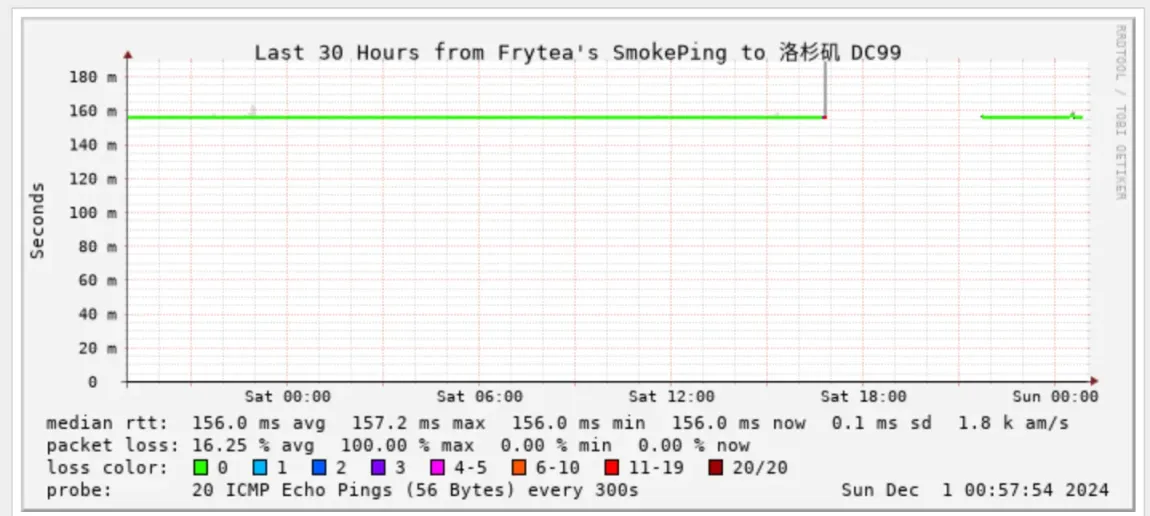
BWH-DC99 网络监控最近30h截图

图中可以看出确实失联了 4h 左右,以下是看到的各种报道。

相关报道

BandwagonHostOfficial

Coresite LA2 datacenter has experienced a power outage. While we have redundant power in all our racks, two DC99 nodes (2705 and 2706) have not been wired correctly when initially installed; they were fed from a single AC feed. We are currently awaiting for the datacenter power to restore. At the same time, we are reaching our to our team in Los Angeles to correct the power wiring.


Coresite LA2数据中心经历了一次停电。尽管我们所有机柜都配备了冗余电源,但两个DC99节点(2705和2706)在最初安装时未正确布线,它们仅连接到单一的交流电源。我们目前正在等待数据中心恢复供电,同时也正在联系我们位于洛杉矶的团队以纠正电源布线问题。

References: https://t.me/BWHOfficial/44409

VPS信号旗播报

搬瓦工 DC99 断电致使 Minibox 服务中断4小时

搬瓦工 Minibox 所在的DC99机房今天下午17时许遭遇断电事故。持续了约4个小时。

该运营商在官方TG群组中表示,DC99故障是由于 Coresite LA2数据中心断电引起的,由于两个DC99节点(2705和2706)在最初安装时未正确布线,致使冗余电源未能发挥作用。本次故障没有在服状态站点中显示。

服务恢复后,部分用户表示他们的控制面板显示机器处于DC9机房而非此前的DC99机房。而DC9是一个完全的CN2GIA机房。搬瓦工未解释这一现象。

[消息等级 Level C2 · 简要]

References: https://t.me/vps_xhq/679

CubeCloud News

同机房的其他厂家对此次事故的反应:

我们洛杉矶可用区所在的CoreSite(LA2)数据中心经历了一次4小时42分钟的大规模电力故障,得益于所有设备均接入进行了双电冗余,由备用电源支持,本次电力故障未对服务产生任何影响,目前主备电力均已恢复供应。

References: https://t.me/CubeCloudNews/517

🥳靠谱VPS推荐(默认带aff) – VPS仓/古博

瓦工机房停电 主要影响了DC99 也就是Minibox套餐

他家官方状态页面竟然没报警

Coresite LA2 datacenter has experienced a power outage. While we have redundant power in all our racks, two DC99 nodes (2705 and 2706) have not been wired correctly when initially installed; they were fed from a single AC feed. We are currently awaiting for the datacenter power to restore. At the same time, we are reaching our to our team in Los Angeles to correct the power wiring.


Coresite LA2数据中心经历了一次停电。尽管我们所有机柜都配备了冗余电源,但两个DC99节点(2705和2706)在最初安装时未正确布线,它们仅连接到单一的交流电源。我们目前正在等待数据中心恢复供电,同时也正在联系我们位于洛杉矶的团队以纠正电源布线问题。

消息源: https://t.me/BandwagonHostGroup/2167432

References: https://t.me/vpscang/7571

常用在线网络测试工具的对比矩阵

常用网络测试工具的对比矩阵:

工具网站 PING TCPing MTR DNS HTTP(S) 端口扫描 路由追踪 IP 查询 多节点 SSL证书 IPv6 API 特色功能
ping.pe ✓ ✓ ✓ ✓ – ✓ ✓ – ✓ ✓ 全球节点,命令行风格
ping.chinaz.com ✓ – ✓ ✓ – ✓ ✓ ✓ – – 国内节点覆盖全,历史记录
itdog.cn ✓ – ✓ ✓ ✓ ✓ ✓ ✓ – – 界面友好,检测报告详细
17ce.com ✓ – ✓ ✓ – ✓ ✓ ✓ – ✓ 性能监控,故障分析
ipip.net ✓ ✓ ✓ – – ✓ ✓ ✓ – ✓ ✓ IP地理位置,AS信息
tool.lu ✓ – ✓ ✓ ✓ ✓ – ✓ – – 工具集合,便捷使用
boce.com ✓ – ✓ ✓ – ✓ ✓ ✓ – ✓ 网站监控,性能分析
ping.eu ✓ – ✓ ✓ ✓ ✓ ✓ – ✓ – 欧洲节点为主
zhale.me ✓ ✓ ✓ ✓ ✓ ✓ ✓ 全球1000+网络拨测节点,模拟用户访问域名/IP,实用小工具,运维必备
ping.sx ✓ ✓ ✓ ✓ ✓
tance.cc ✓ ✓ ✓ ✓ ✓
cesu.net ✓ ✓ ✓ ✓ ✓

功能说明:

  • PING: 基础连通性测试
  • MTR: 路由跟踪和丢包分析
  • DNS: DNS解析测试
  • HTTP(S): 网站可访问性测试
  • 端口扫描: 检测指定端口开放状态
  • 路由追踪: 显示数据包经过的路由
  • 多节点: 支持多地区测试点
  • SSL证书: SSL证书检测
  • IPv6: IPv6支持
  • API: 提供API接口

ChangeLog

RockLinux 安装 Docker

Docker Engine 可以在 Rocky Linux 服务器上运行原生 Docker 风格的容器工作负载。在运行完整的 Docker Desktop 环境时,有时会首选这种方式。

添加 Docker 仓库

使用 dnf 工具将 Docker 仓库添加到你的 Rocky Linux 服务器。输入:

sudo dnf config-manager --add-repo https://download.docker.com/linux/rhel/docker-ce.repo

安装所需的软件包

通过运行以下命令安装最新版本的 Docker Engine、containerd 和 Docker Compose:

sudo dnf -y install docker-ce docker-ce-cli containerd.io docker-compose-plugin

启动并启用 Docker (dockerd)

使用 systemctl 配置 Docker 在重启时自动启动,并同时立即启动它。输入:

sudo systemctl --now enable docker

可选:允许非 root 用户管理 docker

将非 root 用户添加到 docker 组,以允许用户无需 sudo 即可管理 docker。

这是一个可选步骤,但如果你是系统的主要用户,或者想允许多个用户管理 docker 但不想授予他们 sudo 权限,这会很方便。

输入:

# 添加当前用户
sudo usermod -a -G docker $(whoami)

# 添加特定用户
sudo usermod -a -G docker custom-user

要使新组生效,你必须注销并重新登录。使用 id 命令验证组是否已添加。

注释

docker-ce               : 此软件包提供用于构建和运行 docker 容器的底层技术 (dockerd)
docker-ce-cli          : 提供命令行界面 (CLI) 客户端 docker 工具 (docker)
containerd.io          : 提供容器运行时 (runc)
docker-compose-plugin  : 提供 'docker compose' 子命令的插件

References

常用公共 DNS 服务器

汇总表格

名称 IPv4 IPv6
DNSPod 119.29.29.29 2402:4e00::
AliDNS 223.5.5.5 223.6.6.6 2400:3200::1 2400:3200:baba::1
BaiduDNS 180.76.76.76 2400:da00::6666
360DNS 101.226.4.6 218.30.118.6 123.125.81.6 140.207.198.6
114DNS 114.114.114.114 114.114.115.115
ChinaDNS 1.2.4.8 210.2.4.8 2001:dc7:1000::1
OneDNS 117.50.11.11 117.50.22.22
Hi!XNS DNS 40.73.101.101
TWNIC DNS 101.101.101.101 101.102.103.104 2001:de4::101 2001:de4::102

国内知名公共 DNS 服务器

腾讯 DNS (DNSPod)

由 DNSPod 提供的公共免费 DNS,后来 DNSPod 被腾讯(Tencent)收购,现在属于腾讯公司所有,稳定性和连通性也是不错的,经测试海外也可以使用。 DNSPod 除了 IPv4,现在同时支持 IPv6 DNS 和 DoT/DoH 服务。

类型 地址
IPv4 119.29.29.29
IPv6 2402:4e00::
DoH https://doh.pub/dns-query
DoH (国密 SM2) https://sm2.doh.pub/dns-query
DoT dot.pub

阿里 DNS (Alidns)

这组 DNS 是由阿里巴巴提供的,国内连通性还是不错的,海外部分地区连通性不是特别好,具体可以测试一下。 阿里 DNS 同时提供了 IPv4/IPv6 DNS 和 DoT/DoH 服务。

类型 地址
IPv4 223.5.5.5 223.6.6.6
IPv6 2400:3200::1 2400:3200:baba::1
DoH https://dns.alidns.com/dns-query
DoT dns.alidns.com

百度 DNS

中国最大的搜索引擎百度提供的公共 DNS,经测试海外连通性也是不错的,暂时百度只提供了一组 IPv4 和 IPv6 DNS 地址。

类型 地址
IPv4 180.76.76.76
IPv6 2400:da00::6666

360 安全 DNS

360 提供的 DNS 服务,只提供了 IPv4 和 DoT/DoH 服务。

针对中国电信/铁通/移动的 IPv4:

类型 地址
IPv4(电信/铁通/移动) 101.226.4.6 218.30.118.6
IPv4(联通) 123.125.81.6 140.207.198.6
DoH https://doh.360.cn
DoT dot.360.cn

国内运营商

类型 地址
安徽电信IPv4 61.132.163.68 202.102.213.68
北京电信IPv4 219.141.136.10 219.141.140.10
重庆电信IPv4 61.128.192.68 61.128.128.68
福建电信IPv4 218.85.152.99 218.85.157.99
甘肃电信IPv4 202.100.64.68 61.178.0.93
广东电信IPv4 202.96.128.86 202.96.128.166
202.96.134.133 202.96.128.68
广西电信IPv4 202.103.225.68 202.103.224.68
贵州电信IPv4 202.98.192.67 202.98.198.167
河南电信IPv4 222.88.88.88 222.85.85.85
黑龙江电信IPv4 219.147.198.230 219.147.198.242
湖北电信IPv4 202.103.24.68 202.103.0.68
湖南电信IPv4 222.246.129.80 59.51.78.211
江苏电信IPv4 218.2.2.2 218.4.4.4
61.147.37.1 218.2.135.1
江西电信IPv4 202.101.224.69 202.101.226.68
内蒙古电信IPv4 219.148.162.31 222.74.39.50
山东电信IPv4 219.146.1.66 219.147.1.66
陕西电信IPv4 218.30.19.40 61.134.1.4
上海电信IPv4 202.96.209.133 116.228.111.118
202.96.209.5 180.168.255.118
四川电信IPv4 61.139.2.69 218.6.200.139
天津电信IPv4 219.150.32.132 219.146.0.132
云南电信IPv4 222.172.200.68 61.166.150.123
浙江电信IPv4 202.101.172.35 61.153.177.196
61.153.81.75 60.191.244.5
北京联通IPv4 123.123.123.123 123.123.123.124
202.106.0.20 202.106.195.68
重庆联通IPv4 221.5.203.98 221.7.92.98
广东联通IPv4 210.21.196.6 221.5.88.88
河北联通IPv4 202.99.160.68 202.99.166.4
河南联通IPv4 202.102.224.68 202.102.227.68
黑龙江联通IPv4 202.97.224.69 202.97.224.68
吉林联通IPv4 202.98.0.68 202.98.5.68
江苏联通IPv4 221.6.4.66 221.6.4.67
内蒙古联通IPv4 202.99.224.68 202.99.224.8
山东联通IPv4 202.102.128.68 202.102.152.3
202.102.134.68 202.102.154.3
山西联通IPv4 202.99.192.66 202.99.192.68
陕西联通IPv4 221.11.1.67 221.11.1.68
上海联通IPv4 210.22.70.3 210.22.84.3
四川联通IPv4 119.6.6.6 124.161.87.155
天津联通IPv4 202.99.104.68 202.99.96.68
浙江联通IPv4 221.12.1.227 221.12.33.227
辽宁联通IPv4 202.96.69.38 202.96.64.68
江苏移动IPv4 221.131.143.69 112.4.0.55
安徽移动IPv4 211.138.180.2 211.138.180.3
山东移动IPv4 218.201.96.130 211.137.191.26
IPv6(电信) 240e:4c:4008::1 240e:4c:4808::1
IPv6(联通) 2408:8899::8 2408:8888::8
IPv6(移动) 2409:8088::a 2409:8088::b

114DNS

类型 地址
IPv4 114.114.114.114 114.114.115.115

CNNIC DNS

类型 地址
IPv4 1.2.4.8 210.2.4.8
IPv6 2001:dc7:1000::1

Yeti DNS

Yeti IPv6 Project 是由WIDE、TISF 和 BII 发起的一个只针对 IPv6 的互联网公益 DNS 项目,现阶段主要以 IPv6 服务为主。各公司、学校、组织都可以加入这个项目提供 DNS 服务。

类型 地址
IPv6(北京互联网研究所) 240c:f:1:22::6 240C::6666 240C::6644
南京 240e:eb:8001:e01::53
成都 240e:d9:c200:14c:7472::19e0
广州 2408:8756:f5f:4::6

OneDNS

北京微步在线科技有限公司提供的 DNS 服务,不太了解到底怎么样,大家可以试试看。

类型 地址
IPv4 117.50.11.11 117.50.22.22
纯净版 117.50.10.10/52.80.52.52

Hi!XNS DNS 服务器

嘉兴艾泰德信息技术有限公司提供的 DNS 服务,之前也没有了解过。

类型 地址
IPv4 40.73.101.101

TWNIC DNS Quad 101

类型 地址
IPv4 101.101.101.101 101.102.103.104
IPv6 2001:de4::101 2001:de4::102

国内教育网 DNS 服务器

大学的DNS

类型 地址
北京邮电大学 IPv6 2001:da8:202:10::36 2001:da8:202:10::37
上海交通大学 IPv6 DNS 服务器 2001:da8:8000:1:202:120:2:100 2001:da8:8000:1:202:120:2:101
北京科技大学 2001:da8:208:10::6
中国科技网 2001:cc0:2fff:2::6

Yeti DNS Project 注册的 IPv6 DNS 服务器

类型 地址
中科院网络信息中心 2001:cc0:2fff:1::6666
北京交通大学 2001:da8:205:2060::188
清华大学 2001:da8:ff:305:20c:29ff:fe1f:a92a

清华大学 TUNA 协会 DNS 服务器

据说已经停止对校外用户解析,未验证,可以自己试试看。

类型 地址
IPv4 101.6.6.6
IPv6 2001:da8::666

海外知名公共 DNS 服务器

Google Public DNS

Google 提供的公共免费 DNS,应该是最流行的 公共 DNS 了,不过国内可能无法正常使用,同时提供 IPv4/IPv6/DoT/DoH 服务。

类型 地址
IPv4 8.8.8.8 8.8.4.4
IPv6 2001:4860:4860::8888 2001:4860:4860::8844
DoH https://dns.google/dns-query
DoH(IPv6) https://dns64.dns.google/dns-query
DoT dns.google

Cloudflare DNS

Cloudflare DNS 是 Cloudflare 与 APNIC 联合推出的号称全球最快的 DNS 服务。APNIC 是一个管理亚太与大洋洲地区 IP 地址分配的非盈利性组织,1.1.1.1 归 APNIC 所有,现在交给 Cloudflare 来提供 DNS 服务,同时提供 IPv4/IPv6/DoT/DoH 服务。

类型 地址
IPv4 1.1.1.1 1.0.0.1
IPv6 2606:4700:4700::1111 2606:4700:4700::1001
DoH https://cloudflare-dns.com/dns-query
https://1.1.1.1/dns-query
https://1.0.0.1/dns-query
DoH(IPv6) https://dns64.dns.google/dns-query
DoT 1dot1dot1dot1.cloudflare-dns.com one.one.one.one

Quad9 DNS

IBM 发起的 Quad9 提供的公共免费 DNS 服务,同时包含 IPv4/IPv6/DoT/DoH.

类型 地址
IPv4 9.9.9.9 149.112.112.112
IPv6 2620:fe::fe 2620:fe::9
DoH https://dns.quad9.net/dns-query
DoT dns.quad9.net

DNS.SB

德国的一个公共 DNS 服务商 提供的 DNS 服务器,除了德国之外,还在荷兰/英国/爱沙尼亚/俄罗斯/美国/加拿大/日本/新加坡/印度/韩国/香港/澳大利亚等很多国家和地区有服务器,同时提供 IPv4/IPv6/DoT/DoH 服务。

类型 地址
IPv4 45.11.45.11
IPv6 2a09:: 2a11::
DoH https://doh.dns.sb/dns-query https://doh.sb/dns-query
DoT dot.sb

OpenDNS

OpenDNS 是由美国老牌通信设备商 Cisco 思科 提供的公共 DNS 服务,其中基础版和家庭版提供免费的 IPv4/IPv6/DoH 服务。

类型 地址
IPv4 208.67.222.222 208.67.220.220 208.67.222.220 208.67.220.222
IPv6 2620:119:35::35 2620:119:53::53
DoH https://doh.opendns.com/dns-query

OpenDNS FamilyShield

(OpenDNS 家庭盾版 DNS,应该是有安全+防成人内容的功能)

类型 地址
IPv4 208.67.222.123 208.67.220.123
IPv6 2620:119:35::123 2620:119:53::123
DoH https://doh.familyshield.opendns.com/dns-query

Yandex DNS

Yandex DNS 是俄国最大的搜索引擎 Yandex 提供的 DNS 服务,提供基础版/安全版/家庭版三个版本的 IPv4/IPv6 服务。

  • 基础版(快速可靠)

  • 安全版(病毒和钓鱼防御)

  • 家庭版(拦截成人内容)

类型 地址
基础版IPv4 77.88.8.8 77.88.8.1
基础版IPv6 2a02:6b8::feed:0ff 2a02:6b8:0:1::feed:0ff
安全版IPv4 77.88.8.88 77.88.8.2
安全版IPv6 2a02:6b8::feed:bad 2a02:6b8:0:1::feed:bad
家庭版IPv4 77.88.8.7 77.88.8.3
家庭版IPv6 2a02:6b8::feed:a11 2a02:6b8:0:1::feed:a11

COMODO SecureDNS

COMODO 是美国知名的 IT 安全服务商,这个 DNS 是由 COMODO 提供的安全 DNS.

类型 地址
IPv4 8.26.56.26 8.20.247.20

Neustar UltraDNS

Neustar UltraDNS 是美国信息服务公司 Neustar 提供的公共免费 DNS 服务.

  • 基础版(快速可靠)
  • 安全版(病毒和钓鱼防御)
  • 家庭版(拦截成人内容)
类型 地址
基础版IPv4 64.6.64.6 64.6.65.6
基础版IPv6 2620:74:1b::1:1 2620:74:1c::2:2
安全版IPv4 156.154.70.2 156.154.71.2
安全版IPv6 2610:a1:1018::2 2610:a1:1019::2
家庭版IPv4 156.154.70.3 156.154.71.3
家庭版IPv6 2610:a1:1018::3 2610:a1:1019::3

Level 3 Parent DNS

美国 Level 3 Parent 公司 提供的 DNS 服务器,如果 Windows 升级出现问题,可以使用这个 DNS 服务器。

类型 地址
IPv4 4.2.2.1 4.2.2.2 4.2.2.3 4.2.2.4 4.2.2.5 4.2.2.6

References

ArchLinux 图片压缩工具

在 Arch Linux 下有几个优秀的 PNG 图片压缩工具:

  1. OptiPNG
    
    # 安装
    sudo pacman -S optipng

使用示例

optipng -o5 image.png # o5 表示优化级别,范围是 0-7 c“`

  1. pngquant
    
    # 安装
    sudo pacman -S pngquant

使用示例

pngquant –quality=65-80 image.png # 设置质量范围在65-80之间


3. **Trimage**
- 这是一个带 GUI 界面的工具,可以同时压缩 PNG 和 JPEG
```bash
# 安装(从 AUR)
yay -S trimage
  1. oxipng
    
    # 安装(从 AUR)
    yay -S oxipng

使用示例

oxipng -o 4 image.png # o4 表示优化级别,范围是 0-6


个人推荐:
- 如果喜欢命令行,推荐使用 **optipng** 或 **pngquant**
  - optipng 无损压缩,但压缩率相对较低
  - pngquant 有损压缩,但压缩率高,且视觉效果通常很好
- 如果需要 GUI 界面,可以使用 **Trimage**

所有这些工具都可以通过 pacman 或 AUR 轻松安装。你也可以将它们结合使用,以获得最佳的压缩效果。

## OptiPNG

```bash
$ optipng -o5 10ti5a3.png 
** Processing: 10ti5a3.png
2345x1243 pixels, 4x8 bits/pixel, RGB+alpha
Reducing image to 3x8 bits/pixel, RGB
Input IDAT size = 2715319 bytes
Input file size = 2719369 bytes

Trying:
  zc = 9  zm = 9  zs = 0  f = 1         IDAT size = 2669468
  zc = 9  zm = 8  zs = 0  f = 1         IDAT size = 2664950
  zc = 9  zm = 9  zs = 1  f = 1         IDAT size = 2636506
  zc = 9  zm = 8  zs = 1  f = 1         IDAT size = 2634703
  zc = 9  zm = 9  zs = 0  f = 2         IDAT size = 2460587
  zc = 9  zm = 8  zs = 0  f = 2         IDAT size = 2454191
  zc = 9  zm = 9  zs = 0  f = 4         IDAT size = 2337037
  zc = 9  zm = 8  zs = 0  f = 4         IDAT size = 2332616
  zc = 9  zm = 9  zs = 1  f = 4         IDAT size = 2294549
  zc = 9  zm = 8  zs = 1  f = 4         IDAT size = 2289899
  zc = 9  zm = 9  zs = 3  f = 4         IDAT size = 2279697

Selecting parameters:
  zc = 9  zm = 9  zs = 3  f = 4         IDAT size = 2279697

Output IDAT size = 2279697 bytes (435622 bytes decrease)
Output file size = 2279775 bytes (439594 bytes = 16.17% decrease)

# optipng 会覆盖原始文件,这里仅展示大小对比
$ ls -lha 10ti5a3*
-rw-r--r-- 1 songtianlun songtianlun 2.2M 11月22日 09:46 10ti5a3-c.png
-rw-r--r-- 1 songtianlun songtianlun 2.6M 11月22日 09:46 10ti5a3.png

pngquant

$ pngquant --quality=65-80 10ti5a3.png
$ ls -lha 10ti5a3*
-rw-r--r-- 1 songtianlun songtianlun 2.2M 11月22日 09:46 10ti5a3-c.png
-rw-r--r-- 1 songtianlun songtianlun 987K 11月22日 09:50 10ti5a3-fs8.png
-rw-r--r-- 1 songtianlun songtianlun 2.6M 11月22日 09:46 10ti5a3.png

Trimage

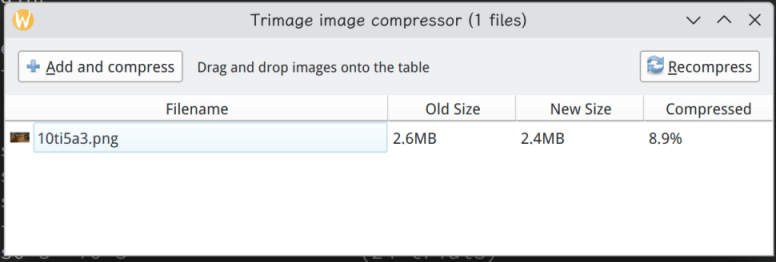
Trimage 软件截图

效果类似 OptiPNG,灵活性不及,好在有 GUI,按需选择。

除此之外还有类似 tinypng 在线方案,也很好用。

#ArchLinux #GNU_Linux

K8s 第一个容器及服务 whoami

示例资源清单

示例部署资源清单:

apiVersion: apps/v1
kind: Deployment
metadata:
  name: whoami-deploy
spec:
  replicas: 1
  selector:
    matchLabels:
      app: whoami
      release: canary
  template:
    metadata:
      labels:
        app: whoami
        release: canary
    spec:
      containers:
      - name: whoami
        image: traefik/whoami:v1.10
        ports:
        - name: http
          containerPort: 80

---
apiVersion: v1
kind: Service
metadata:
  name: whoami
spec:
  type: NodePort
  selector:
    app: whoami
    release: canary
  ports:
  - name: http
    port: 80
    targetPort: 80 # pod port
    nodePort: 30080

部署:

kubectl apply -f xxx.yaml

关键参数说明

我来为您解释这个 Kubernetes 配置文件中的关键参数:

Deployment 部分

apiVersion: apps/v1  # K8s API 版本
kind: Deployment     # 资源类型为 Deployment

metadata:

  • name: whoami-deploy – Deployment 的名称

spec:

  • replicas: 1 – 指定要运行的 Pod 副本数量
  • selector – 用于选择要管理哪些 Pod
    • matchLabels – Pod 必须包含这些标签才会被该 Deployment 管理
      • app: whoami
      • release: canary

template: – Pod 的模板定义

  • metadata/labels – 为创建的 Pod 添加标签
  • containers – 容器配置
    • image: traefik/whoami:v1.10 – 使用的容器镜像
    • containerPort: 80 – 容器内部暴露的端口

Service 部分

kind: Service       # 资源类型为 Service
type: NodePort      # Service 类型为 NodePort,允许从集群外访问

selector: – 选择要暴露哪些 Pod

  • 与 Deployment 中的标签对应:
    • app: whoami
    • release: canary

ports:

  • port: 80 – Service 的端口
  • targetPort: 80 – Pod 的目标端口
  • nodePort: 30080 – 节点上暴露的端口(可以通过 :30080 访问)

重要概念说明:

  1. 这是一个完整的应用部署配置,包含了 Deployment(管理 Pod)和 Service(暴露服务)两部分

  2. 标签(Labels)在这里起到了关键作用:

    • Deployment 使用标签选择器来管理 Pod
    • Service 使用相同的标签来确定要暴露哪些 Pod
  3. 端口映射关系:

    • 容器端口 80
    • Service 端口 80
    • 节点端口 30080(外部访问端口)
  4. NodePort 类型的 Service 允许从集群外部访问服务,端口范围通常在 30000-32767 之间

kuboard v3 快速部署

Kuboard 官网给的 k8s 单节点快速部署似乎不太好用,直接用 docker 的翻译了一份,用于快速部署。

---
apiVersion: v1
kind: Namespace
metadata:
  name: kuboard
---
apiVersion: apps/v1
kind: Deployment
metadata:
  name: kuboard
  namespace: kuboard
spec:
  replicas: 1
  selector:
    matchLabels:
      app: kuboard
  template:
    metadata:
      labels:
        app: kuboard
    spec:
      containers:
      - name: kuboard
        image: eipwork/kuboard:v3
        ports:
        - containerPort: 80
          name: http
        - containerPort: 10081
          name: agent
        env:
        - name: KUBOARD_ENDPOINT
          value: "http://192.168.26.133:30080"  # 请替换为您的实际内网 IP
        - name: KUBOARD_AGENT_SERVER_TCP_PORT
          value: "10081"
        volumeMounts:
        - name: data
          mountPath: /data
      volumes:
      - name: data
        hostPath:
          path: /etc/kuboard/data
          type: DirectoryOrCreate
---
apiVersion: v1
kind: Service
metadata:
  name: kuboard-svc
  namespace: kuboard
spec:
  selector:
    app: kuboard
  ports:
  - name: http
    port: 80
    targetPort: 80
    nodePort: 30080
  - name: agent
    port: 10081
    targetPort: 10081
  type: NodePort

Kubard 官网:https://kuboard.cn/

#Kubernetes